
· Brown Walrus · Updated
Cybersecurity trends in 2026: four tricks every small business should know
Four attacks stand out in 2026 security reports, and each can reach a small business. In every one, the attacker gets you, or software you trust, to do the work: you paste a command from a web page, type a code from an email, let a fake IT person onto your screen, or install a routine update with something extra inside.
Three of them come from public reports by CyberAlberta's threat intelligence team, which tracks threats facing Alberta organizations.
1. Fake "verify you're human" pages
You click "I'm not a robot", then the page shows keyboard steps: press the Windows key and R, paste, press Enter. The page has already put a command on your clipboard. Pressing Enter runs it on your computer.
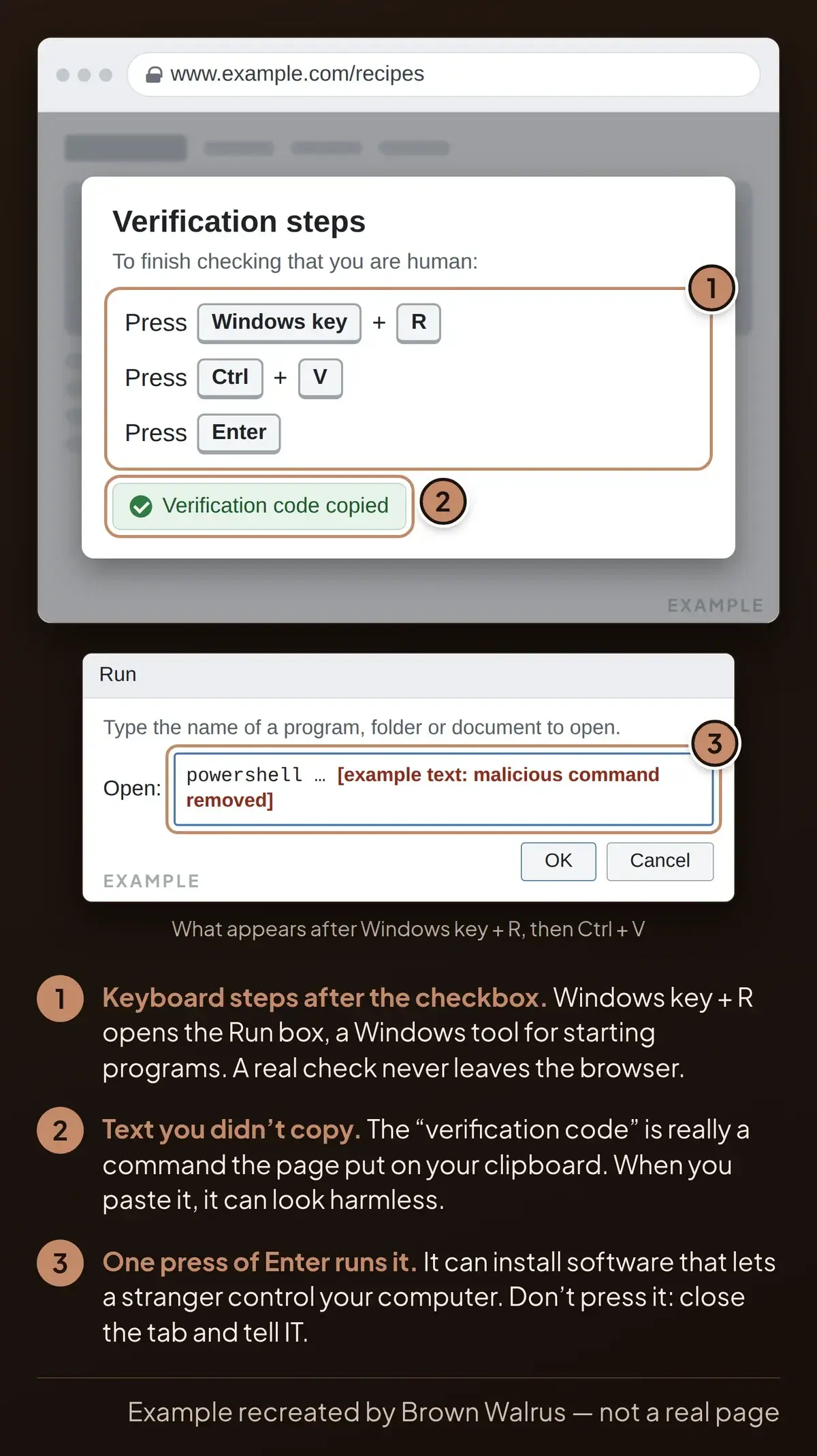
Researchers call this ClickFix. In an advisory published August 27, 2026, CyberAlberta traced a campaign that planted these pages on hacked, legitimate websites. In one case, the steps installed a remote-control program, the kind that can give an attacker the run of a computer.
What to do: close any page that asks you to paste something into Windows to prove you're human, and tell IT. A real CAPTCHA (the "I'm not a robot" check) keeps you inside the browser.
Read more: How to spot a ClickFix fake CAPTCHA
2. Sign-in codes that get past MFA
MFA (multi-factor authentication) means a second check after your password, such as a prompt on your phone. Device code phishing gets around it. An email invites you to open a shared document and gives you a short code to type into Microsoft's genuine sign-in page. You enter it, then sign in or pick your account, and Microsoft logs the attacker's computer into your account. Any MFA check along the way passes, because you are the one doing it.
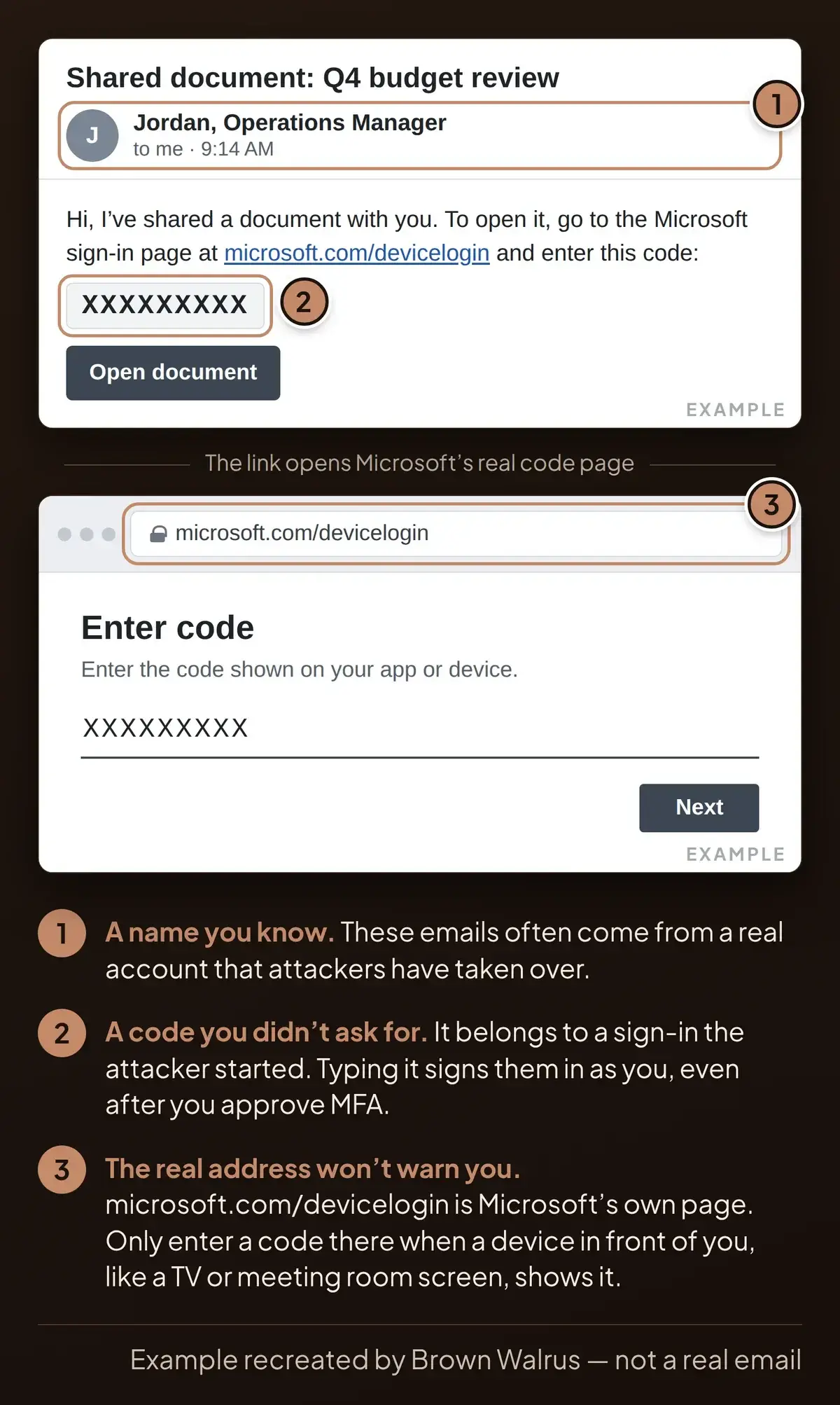
CyberAlberta's April 20, 2026 advisory describes three of these attacks it saw between March 25 and April 20. Two of the emails came from real accounts at Alberta organizations that attackers had already taken over, so the sender looked familiar.
What to do: type a sign-in code only if the device asking for it is right in front of you, like a smart TV or a meeting room screen. A code that reached you by email belongs to someone else. Keep MFA on, since it still stops attackers who only have your password.
Read more: Device code phishing: how it gets past MFA
3. Fake IT support in Microsoft Teams
An attacker sets up their own Microsoft 365 account, names it something like "Help Desk" and messages or calls your staff in Teams. They claim something is wrong with your account, then ask you to open a remote support tool, such as Windows Quick Assist, type in a short code they give you and click through the prompts that follow. Finishing those steps hands them control of your computer. Saying no at any prompt stops them.
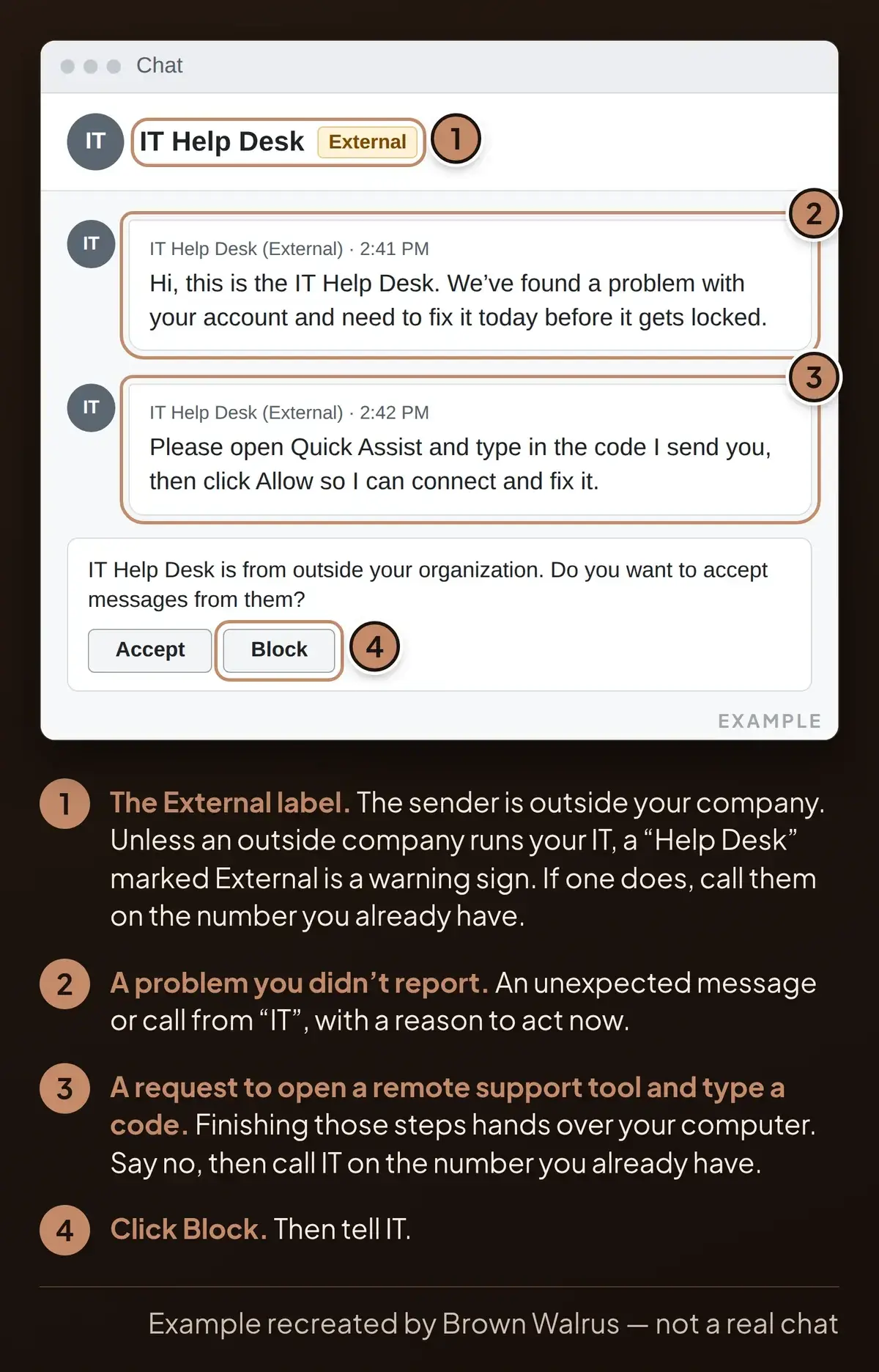
In an April 18, 2026 report, Microsoft's security researchers describe attackers who used that access to move deeper into company networks and copy data to outside cloud storage.
What to do: treat an unexpected message or call from "IT" as suspect, more so when Teams shows an "External" label, which means the sender is outside your company. Hang up and call your IT team on the number you already have. For business owners, Teams lets people from any outside organization message your staff by default. Your IT team can limit that to the companies you work with.
4. Poisoned software updates
Developers build websites and apps from shared building blocks that get regular updates. In March 2026, attackers broke into the account behind one of the most popular blocks and slipped harmful code into an update. CyberAlberta's March 31, 2026 advisory notes that the poisoned update stayed up for under three hours.
Keep installing updates on your own computers and phones. This risk sits with whoever builds your website.
What to do: ask whoever builds your website or apps how they decide when to take updates, and how fast they would know if a poisoned one reached your site.
In our web development work, we decide when updates go onto the client sites we look after. Ask us if you want the same for your site.
What to do this month
- Brief your staff on four rules: don't paste anything a web page asks you to; don't type a sign-in code you didn't ask for; don't let "IT" onto your screen unless you called them; and report anything odd, even after the fact.
- Check MFA on every email account, starting with yours and anyone who handles money.
- Ask IT about Teams: can people from any outside organization message your staff? Limit it to the companies you work with.
- Ask IT about device code sign-in: if nobody in the business needs it, they can block it.
- Agree how IT will contact staff. Microsoft suggests a spoken code word that your help desk and employees share.
- Post your IT team's phone number where everyone can find it.
If someone already clicked
Call IT straight away, even if you're not sure. If we look after your IT, call us at 780-540-7606. If it happened on your computer, disconnect it from the network and leave it on. If you typed a sign-in code, tell IT that too: they need to sign your account out everywhere. From a different device, change your passwords as soon as you can, starting with email and banking. IT can help you work out which ones. Our ClickFix and device code guides cover the cleanup.
IT teams can find the technical details in the CyberAlberta and Microsoft reports linked above.
Frequently asked questions
What are the biggest cybersecurity threats for small businesses in 2026?
Four tricks stand out in 2026 public reports: fake "verify you're human" pages that tell you to paste a command, emails with sign-in codes that get past MFA, fake IT support in Microsoft Teams, and poisoned updates to the shared building blocks websites are made from. CyberAlberta reported three of them, and Microsoft reported the Teams one. Each one gets a person, or a tool they trust, to do the attacker's work.
Is my small business a target?
Yes. ClickFix pages sit on hacked websites and catch anyone who visits, whatever the size of their business. Device code emails tend to arrive from a mailbox attackers have already broken into, so they look like they're from someone you know. CyberAlberta saw two of these this spring sent from hacked accounts at Alberta organizations.
Does MFA still protect my business?
Yes, so keep it on. MFA stops an attacker who only has your password. Device code phishing gets around it because you pass the MFA check yourself, on Microsoft's real page, for a sign-in the attacker started. Enter a code only when a device in front of you shows it, and ask IT to block device code sign-in if nobody in the business needs it.
How can I tell if an IT support message in Teams is real?
Look for the External label. Teams marks people from other organizations that way and shows an accept or block screen the first time they message you. If your IT team works in-house, a "Help Desk" marked External is a warning sign. If an outside company runs your IT, call them on the number you already have and ask. Don't open a remote support tool or type in a code for anyone you didn't call yourself.
What is a supply chain attack, and could it affect my website?
A supply chain attack poisons something you trust so it reaches you through a normal update. In March 2026, attackers slipped harmful code into an update of a popular website building block, and it stayed up for under three hours. Any computer or server that installed it during those hours gave the attackers a way in. Keep updating your own devices. If someone builds your website for you, ask them how they check updates before they install them.
What should I do if I think I fell for one of these?
Call IT straight away, even if you're not sure, and tell them what you clicked, pasted or typed. If it happened on your computer, disconnect it from the network and leave it on. From a different device, change your passwords as soon as you can, starting with email and banking. If you entered a sign-in code, IT also needs to sign you out on every device and look for inbox rules you didn't set up, which can hide or redirect your mail.
Want a security check?
We can check your Microsoft 365 and Teams settings, MFA and how your website takes updates, then tell you what to fix first. Call us at 780-540-7606. Through our cybersecurity and managed IT services, we can make the fixes too.