
· Brown Walrus · Updated
ClickFix fake CAPTCHA pages: how to spot one and what to do
If a web page asks you to press the Windows key and R, paste something and press Enter to prove you're human, close the page and tell your IT team. Real CAPTCHAs (the "I'm not a robot" checks) don't ask you to open anything in Windows. Following those steps can give a stranger control of your computer.
Security researchers call this trick ClickFix. CyberAlberta, which tracks threats facing Alberta organizations, described a run of ClickFix attacks in an advisory published August 27, 2026. The fake checks showed up on real websites that attackers had broken into, so a site you visit every week could show you one.
What a ClickFix fake CAPTCHA looks like
In CyberAlberta's report, the fake check copied Google's "I'm not a robot" box. Other versions pose as a browser warning or a document you have to "verify" before it opens. Watch for these signs:
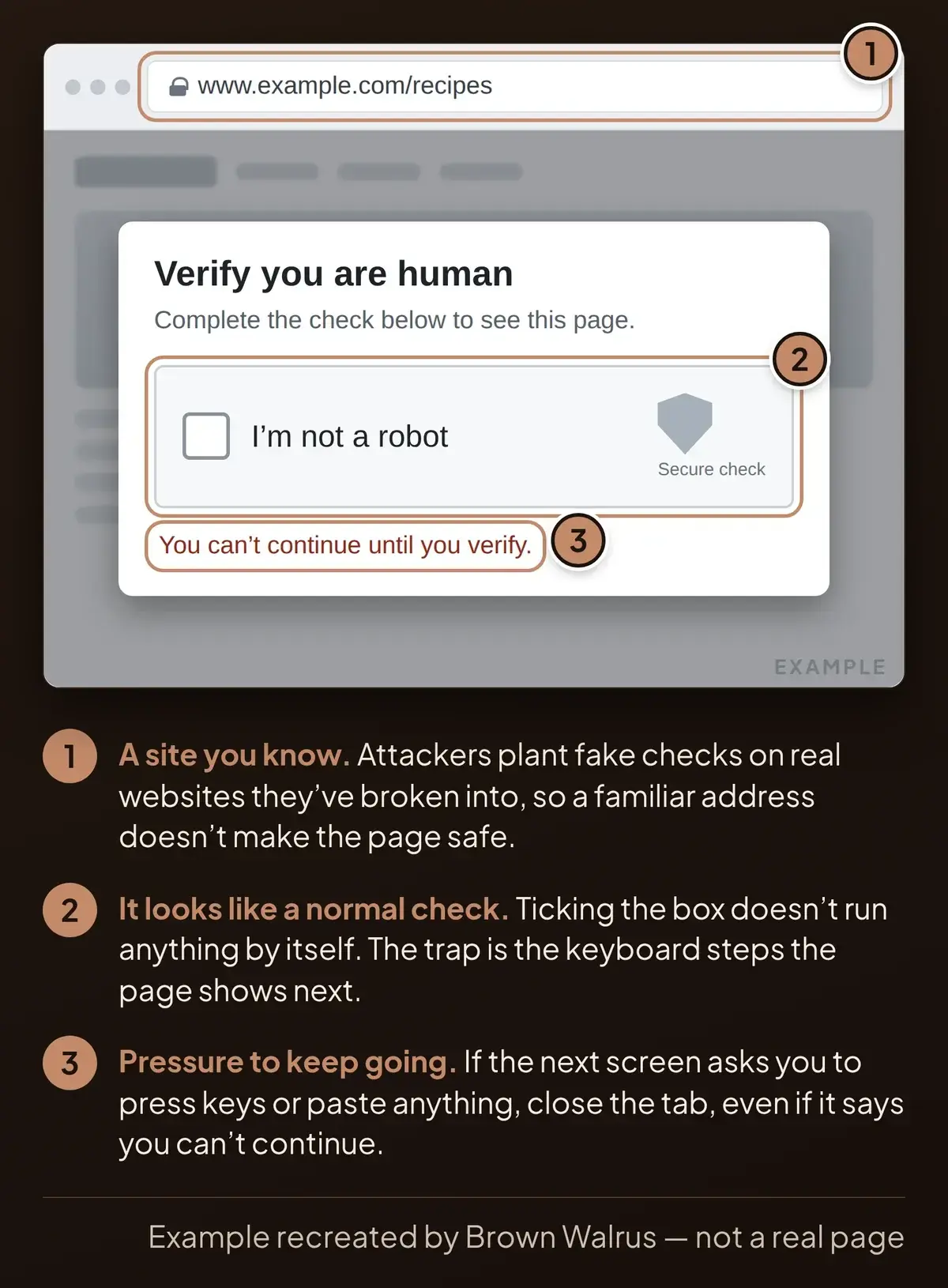
- Steps after the checkbox. You tick the box, and the page shows a short list of keyboard instructions.
- Windows key and R, then paste, then Enter. That shortcut opens the Run box, a small Windows window for starting programs. Some fake pages ask you to open PowerShell or Terminal instead, which are other places to type commands.
- Text you didn't copy. The page has already put a command on your clipboard. You only see it when you paste, and one press of Enter runs it.
- A site you know. The attackers plant these pages on hacked websites, so a familiar address doesn't make the page safe.
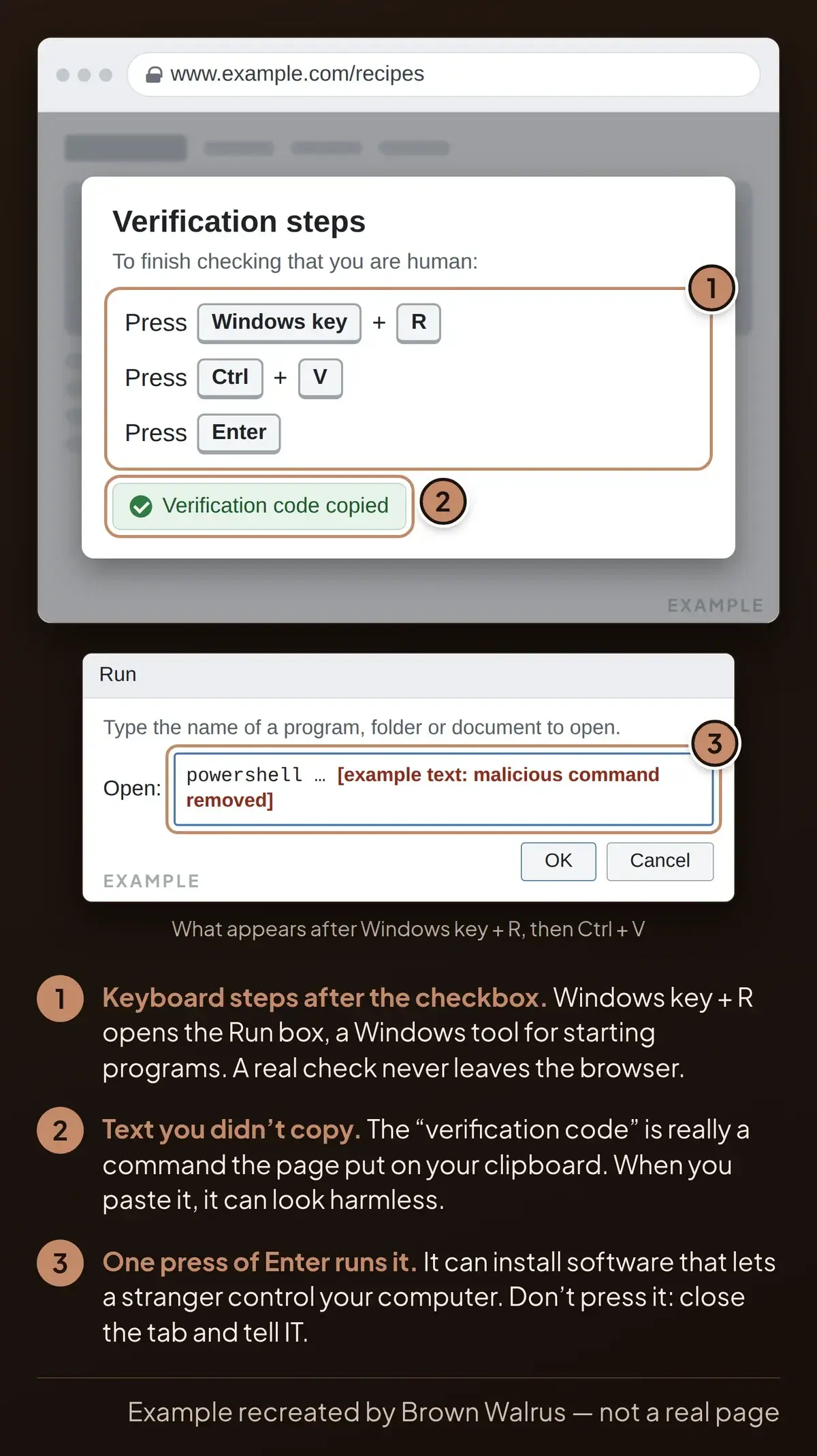
A real CAPTCHA asks you to tick a box or pick out pictures, and all of it happens inside the browser window.
What to do, and what not to do
- Close the tab as soon as a check asks for keyboard steps.
- Tell your IT team which site you were on. A phone photo of the screen helps.
- Don't press the keys, paste or press Enter, even if the page says you can't continue without it.
- Don't go back to that site until IT says it's safe. Its owner may not know attackers broke in.
If you already did it
Closing the browser won't undo what the command installed, so act now:
- Disconnect the computer. Unplug the network cable or turn off Wi-Fi. Leave the computer on, because IT may need to see what's running.
- Call IT right away. Tell them the site, the time and what the page asked you to do.
- Stop using that computer until IT has checked it or set it up again.
- Change your passwords from a different device as soon as you can, starting with email and banking. IT can help you work out which ones. Software like this can let someone watch what you type, so treat any password you used on that computer as exposed.
Report it even if you feel silly. The sooner IT knows, the less time an attacker gets on your computer.
Why the trick works
Attackers break into a real website and make it show a fake human check. If you paste and press Enter, you run their command yourself. In the case CyberAlberta traced, it installed remote-control software in the background. With that kind of software, an attacker can watch your screen, copy your files, run programs and try to reach other computers on your network.
What CyberAlberta recommends
Two of CyberAlberta's recommendations fit any small business:
- Warn your staff. Make sure everyone knows that a real "verify you're human" check won't ask them to press Windows and R or paste anything. A few minutes at your next team meeting covers it.
- Switch off the Run box. Your IT team can turn it off on staff computers with a Windows setting, so the shortcut stops working. Keep the staff warning too, because some fake pages ask for PowerShell instead.
How we can help
If we manage your computers and you see one of these pages, close it and call us at 780-540-7606. If you already followed the steps, disconnect the computer and call us straight away. Through our managed IT and cybersecurity services, we can switch off the Run box on your staff computers and walk your team through what these fake checks look like.
This is one of four tricks in our 2026 cybersecurity trends roundup. IT teams can find the technical details in CyberAlberta's full report.
Frequently asked questions
What is a ClickFix attack?
ClickFix is a scam where a web page talks you into running a command (an instruction your computer carries out) on your own computer. The page shows a fake check or error, copies a command for you and tells you to press Windows+R, paste and press Enter. When you do, the command can install software that lets a stranger control your computer.
How do you know if a CAPTCHA is fake?
Look at what it asks you to do. A real CAPTCHA keeps everything inside the browser: you tick a box or pick out pictures. A fake one asks you to press Windows+R, which opens a Windows tool, or to paste something into PowerShell or Terminal. If a check asks you to paste and press Enter, close the page, even on a site you trust.
What does a ClickFix scam do to my computer?
It gets you to install the attacker's software for them. In the case CyberAlberta traced, the command installed a remote-control program. Software like that can let an attacker watch your screen, copy your files, run programs and try to reach other computers on the same network.
What should I do if I already ran it?
Disconnect the computer from the internet by unplugging the cable or turning off Wi-Fi, but leave it on. Call your IT team right away and tell them which site you were on. Stop using that computer until IT has checked it. From a different device, change your passwords as soon as you can, starting with email and banking.
Is my business a target?
Any business with Windows computers can run into one. Attackers put these fake checks on ordinary websites they have hacked, so anyone who visits can see one, whatever the size of their business. A staff member looking up a supplier or a recipe on a work computer is exposed in the same way.
How do I stop ClickFix scams at my business?
Start with your staff: tell everyone that a real human check never asks them to press Windows+R or paste anything. Then have IT switch off the Windows Run box on staff computers, as CyberAlberta recommends. Some fake pages ask for PowerShell instead, so the staff warning still matters. If we manage your computers, we can make that change for you.
Seen a page asking you to press Windows+R?
Close it and call us at 780-540-7606. If you're not sure a page is safe, send us the address and we'll check it. We can also run a short session with your staff on how to spot fake checks like this one.